

Why hosting matters more than it seems
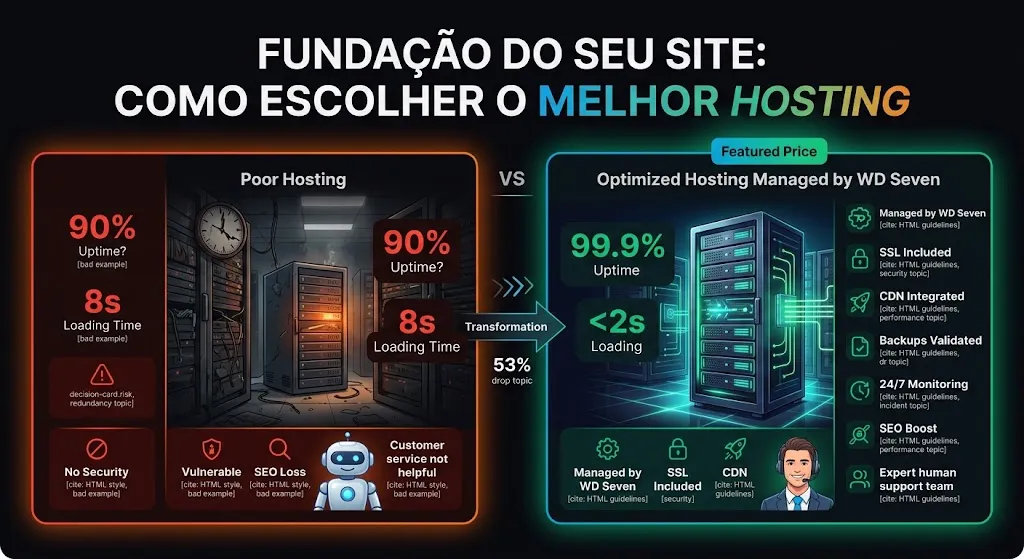
Many people treat hosting as just another technical detail — they pick the cheapest plan, set it up once and forget about it. That's one of the most expensive mistakes a business can make online: hosting is the foundation on which everything else on your website is built.
A slow, unstable or vulnerable website directly hurts sales, reputation and Google rankings. Worse: many problems only show up when it's already too late — in the middle of a marketing campaign, during a traffic spike, or after an attack.
The right question isn't "which one is cheapest"
It's "which hosting supports my growth, protects my data and keeps my site online when I need it most?" Saving on hosting usually costs much more later.
Hosting types: understand your options
Before comparing providers, it's essential to understand the available hosting categories — each with an ideal audience and stage.
Shared hosting
Multiple sites share the same server and resources. Cheap, but unstable under traffic spikes and with shared security risks.
VPS (Virtual Private Server)
Dedicated resources inside a shared physical server. More control and stability, but requires technical knowledge to configure.
Cloud hosting
Distributed infrastructure (AWS, GCP, Azure) with elastic scalability. Ideal for those who need to grow without downtime.
Dedicated server
A physical server just for you. Maximum performance and control, with higher cost and operational complexity.
Technical criteria that really matter
Price shouldn't be the first criterion in your decision. Before it, evaluate:
Guaranteed uptime (SLA)
Look for contracts with at least 99.9% availability guaranteed in writing, not just promised.
Server location
Servers close to your audience reduce latency and improve response times.
Automatic, versioned backups
Daily backups, stored off the main server, with at least 7–30 days of history.
On-demand scalability
Infrastructure must handle traffic spikes (campaigns, promotions) without performance drops.
Real technical support
Human, fast and technically competent support — not just a generic chatbot.
Not sure how to evaluate these criteria in practice?
WD Seven's Cloud & DevOps team analyzes your current infrastructure and recommends the ideal solution for your case.
Security: the most neglected item
Most people only think about hosting security after suffering an attack. But security should be evaluated before signing up, not after the incident.
SSL included
Without SSL, browsers flag your site as "not secure" — driving visitors away and hurting SEO.
Firewall & DDoS protection
Protection against denial-of-service attacks, which can take a site down in minutes.
Malware monitoring
Continuous scanning to detect and remove malicious code before it affects visitors.
Cheap hosting tends to ignore security
Very cheap plans often share resources insecurely across hundreds of sites on the same server — if a neighbor gets compromised, the risk spreads.
Performance and SEO: the direct link
Google has used page speed as a ranking factor since 2021 (Core Web Vitals). Slow hosting isn't just a user experience problem — it's a visibility problem in search results.
Integrated CDN
Distributes content across servers worldwide, reducing the distance to each visitor.
Server-level caching
Reduces repeated processing load, speeding up response times under concurrent traffic.
Practical examples: what good management looks like
Behind a fast, secure website there's continuous, often invisible work. Here are two simple examples of what a specialized team configures and maintains for you.
server {
  listen 443 ssl http2;
  server_name www.yoursite.com;

  ssl_certificate     /etc/letsencrypt/live/yoursite.com/fullchain.pem;
  ssl_certificate_key /etc/letsencrypt/live/yoursite.com/privkey.pem;

  gzip on;
  gzip_types text/css application/javascript image/svg+xml;

  location ~* \.(css|js|png|jpg|webp|svg|woff2)$ {
    expires 30d;
    add_header Cache-Control "public, immutable";
  }
}
#!/bin/bash
# runs daily via cron: 0 3 * * * /opt/scripts/backup.sh
DATE=$(date +%F)
mysqldump -u backup -p"$DB_PASS" site_db | gzip > /backups/db-$DATE.sql.gz
tar -czf /backups/files-$DATE.tar.gz /var/www/site
aws s3 sync /backups s3://yoursite-backups/ --storage-class STANDARD_IA
find /backups -mtime +30 -delete   # keep 30 days locally
Writing these configs once is the easy part. The real work is keeping them running: renewing certificates, testing backup restores, adjusting caching after site changes and reacting when an alert fires at 3 a.m. That's exactly what a managed service covers.
Common mistakes when choosing hosting
❌ Frequent mistakes
- Choosing solely based on the lowest price
- Ignoring the physical location of servers
- Not checking the actual backup policy
- Leaving renewals and updates unmonitored
- Managing infrastructure without in-house technical expertise
✅ Best practices
- Evaluate SLA, support and uptime history before signing
- Choose infrastructure that scales as you grow
- Keep backups tested and automated
- Monitor security and performance continuously
- Rely on a specialized team to manage it all
Hosting types compared
| Type | Cost | Performance | Scalability | Best for |
|---|---|---|---|---|
| Shared | Low | Limited | Low | Small institutional sites |
| VPS | Medium | Good | Medium | Growing businesses |
| Cloud hosting | Medium-High | Excellent | High | E-commerce and enterprise platforms |
| Dedicated | High | Excellent | Manual | High demand and compliance requirements |
Why hire specialized management
Choosing the right hosting type is only the first step. The real challenge is maintaining it: applying security updates, monitoring performance, configuring backups, responding to incidents at 3 a.m. That takes time and technical expertise most companies simply don't have in-house.
This is exactly where a specialized company like WD Seven adds value: instead of juggling dozens of dashboards, providers and technical alerts, you get a dedicated team handling your entire infrastructure — from choosing the right provider to continuous monitoring, backups, security and performance.
Proactive monitoring
Problems are identified and fixed before they affect your visitors or customers.
Ongoing maintenance
Security updates, optimizations and performance tuning applied on a recurring basis.
Managed hosting is an investment, not a cost
One hour of downtime during a campaign or a single data breach usually costs far more than a full year of professional management.
Leave your hosting in expert hands
WD Seven provides ongoing maintenance & support and Cloud & DevOps to keep your site fast, secure and always online.
Checklist before choosing
Does the provider contractually guarantee at least 99.9% uptime?
Are backups automatic, versioned and tested?
Does the infrastructure scale without downtime during traffic spikes?
Are SSL, firewall and DDoS protection included?
Is technical support human, fast and qualified?
Do you have the time and expertise to manage this alone — or do you need a specialized team?
Conclusion
Choosing the right hosting isn't about finding the cheapest plan, but understanding your business's real needs: expected traffic, system criticality and incident response capacity. A poor decision here is costly — in lost sales, damaged SEO and vulnerable data.
Choose carefully
Evaluate uptime, security and scalability, not just price.
Prioritize security
SSL, firewall and backups aren't optional.
Think about scale
Your hosting must grow with your business.
Rely on experts
Professional management saves time and headaches.
Want to stop worrying about hosting?
WD Seven chooses, configures and manages your entire website infrastructure, with 24/7 monitoring and specialized support.