

Understanding the difference with an analogy
The simplest way to understand the difference is to think about housing. Shared hosting is like living in a shared house with roommates; a VPS is like having your own apartment in a building.
🏠 The shared house
Cheap rent, but you share the kitchen, bathroom and internet. If one roommate throws a party, everyone suffers from the noise — and the line for the shower.
🏢 The apartment
You only share the building's structure, but you have your own space, your own key and your own resources. On the other hand, maintaining the apartment is your responsibility.
And specialized management?
Following the analogy: it's like having a building manager and a maintenance team looking after your apartment 24 hours a day. You enjoy the space — and someone fixes the leak at 3 a.m.
VPS: pros and cons
A VPS (Virtual Private Server) uses virtualization to split a physical server into isolated environments. Each VPS has guaranteed resources, its own operating system and root access.
With a VPS you get root access to the server — total freedom, but also total responsibility.
Stable performance
Reserved CPU and RAM: other customers' traffic doesn't affect your site.
Total freedom
Install Node.js, Redis, Docker or any stack your project needs.
Scalability
Increase resources as your business grows, usually without switching servers.
Requires technical knowledge
Linux, firewall, updates, SSL, backups and monitoring are all your responsibility.
Mistakes are costly
One open port or an outdated package can expose the entire server to attacks.
Side-by-side comparison
| Criterion | Shared | Unmanaged VPS | Managed VPS |
|---|---|---|---|
| Cost | Low | Medium | Medium-High |
| Performance | Unstable | High | High and optimized |
| Dedicated resources | No | Yes | Yes |
| Security | Shared | Up to you | Monitored 24/7 |
| Technical knowledge | None | Advanced | None |
| Scalability | Low | High | High and planned |
| Best for | Simple sites and small blogs | Teams with in-house DevOps | Businesses that want performance without the headaches |
Simulator: how each one handles traffic
Drag the slider to see, for illustration purposes, how response time tends to behave on each hosting type as concurrent visitors increase.
Illustrative values for educational purposes. Actual results vary by application, provider and optimization.
Practical examples and real scenarios
📄 Corporate website for an accounting firm
Five pages, a contact form and a few hundred visits per month. Shared hosting usually works well here — as long as it has SSL, backups and someone keeping an eye on updates.
🛒 E-commerce store running a Black Friday campaign
On shared hosting, the traffic spike hits the process limit and checkout freezes exactly when sales should be soaring. On a managed VPS, with caching and resources tuned before the campaign, the store handles the traffic.
⚙️ Web system / internal ERP
Applications with Node.js, queues, workers and dedicated databases simply don't run on shared hosting. A VPS is mandatory — and professional management ensures availability for the entire operation.
What a VPS needs on day one
To illustrate the technical responsibility involved, here's a snippet of the bare minimum that should be done when setting up a new Linux VPS — before the site even goes live:
# 1. Update the system
sudo apt update && sudo apt upgrade -y

# 2. Create a non-root user
sudo adduser deploy && sudo usermod -aG sudo deploy

# 3. Disable root login and password auth via SSH (keys only)
sudo sed -i 's/^#\?PermitRootLogin.*/PermitRootLogin no/' /etc/ssh/sshd_config
sudo sed -i 's/^#\?PasswordAuthentication.*/PasswordAuthentication no/' /etc/ssh/sshd_config
sudo systemctl restart ssh

# 4. Firewall: allow only what's needed
sudo ufw allow OpenSSH
sudo ufw allow 80,443/tcp
sudo ufw enable

# 5. Brute-force protection
sudo apt install fail2ban -y

# 6. Automatic security updates
sudo apt install unattended-upgrades -y
sudo dpkg-reconfigure --priority=low unattended-upgrades
#!/bin/bash
# */5 * * * * /opt/scripts/health.sh
CPU=$(top -bn1 | grep "Cpu(s)" | awk '{print 100 - $8}')
RAM=$(free | awk '/Mem/ {printf "%.0f", $3/$2*100}')
DISK=$(df / | awk 'NR==2 {gsub("%",""); print $5}')
HTTP=$(curl -s -o /dev/null -w "%{http_code}" https://www.yoursite.com)

if [ "$HTTP" != "200" ] || [ "${RAM}" -gt 90 ] || [ "${DISK}" -gt 85 ]; then
  echo "ALERT: HTTP=$HTTP CPU=$CPU% RAM=$RAM% DISK=$DISK%" \
    | mail -s "Server issue detected" team@yoursite.com
fi
And that's just the beginning: you still need a web server, SSL with auto-renewal, a database, off-site backups, logging, cache optimization and an incident response plan. Setting it up once is easy; keeping everything running every single day is the real work.
The critical point: who manages the VPS?
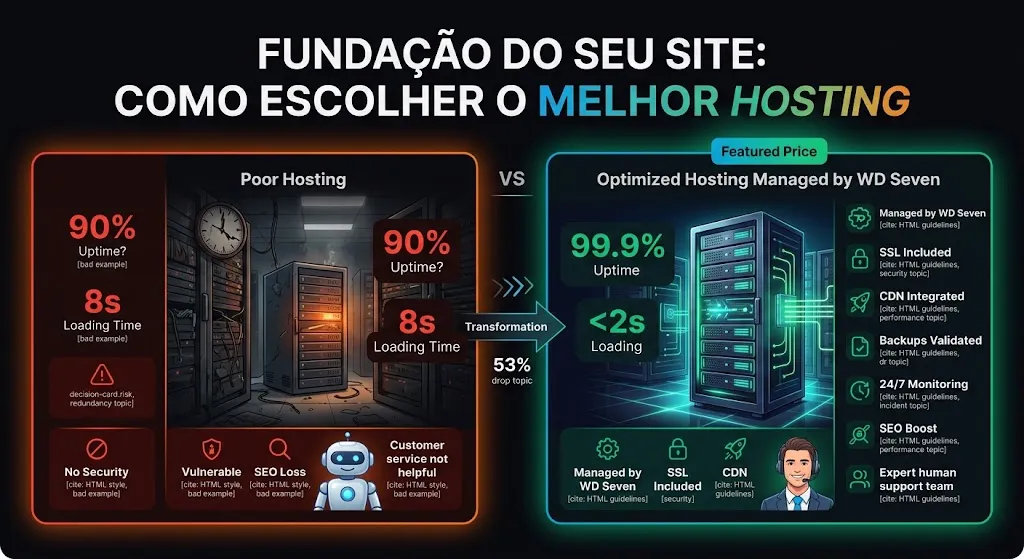
In most cases, a VPS is the technically superior choice. But a VPS without professional management can be more dangerous than shared hosting: without updates, a properly configured firewall and monitoring, it becomes an easy target.
With a specialized team, your VPS delivers its full potential without overloading your staff.
This is where WD Seven makes the difference. Our team sizes the ideal VPS for your project, hardens its security, configures caching and CDN, automates backups and monitors the server continuously — so you get VPS-level performance with the peace of mind of never having to open a terminal.
Right-sizing
No excess resources (unnecessary cost) and no shortage (slowness). The right VPS for your traffic.
Ongoing security
Updates, firewall, brute-force protection and recurring vulnerability assessments.
Zero-downtime migration
A planned move from shared hosting to a VPS, without taking your site offline.
24/7 monitoring
Automatic alerts and fast response before a problem ever reaches your customers.
Want a VPS without the headaches?
With Cloud & DevOps and Maintenance & Support, WD Seven takes care of your entire infrastructure.
Signs it's time to migrate
Your site slows down at peak times
A clear sign that shared resources can no longer keep up.
You get "resource limit exceeded" warnings
Your provider is throttling your site's CPU or processes.
Your project needs specific technologies
Node.js, Redis, workers, Docker or specific PHP and database versions.
Your site now generates meaningful revenue
Every minute offline now means lost sales and leads.
You've had security issues or blocked emails
An isolated, managed environment drastically reduces these risks.
Checked two or more items?
WD Seven offers a free assessment of your current hosting and plans the ideal migration.
Frequently asked questions
Technically, yes: dedicated resources, more security and more control. But for very simple sites, shared hosting may be enough. The choice depends on your business stage and who will manage the environment.
With an unmanaged VPS, yes — quite a lot: Linux, networking and security. With a VPS managed by WD Seven, our team handles all the technical work.
It doesn't have to. With proper planning — cloning the environment, testing and switching DNS at the right moment — migration happens with no noticeable downtime.
In most cases, yes. A single outage on a campaign day or one security incident usually costs more than months of professional management.
Conclusion
Shared hosting is a good starting point for small projects, but it quickly becomes a bottleneck for anyone who wants to grow. A VPS offers performance, isolation and freedom — as long as it's well managed. That's why the winning combination for most businesses is clear: VPS + specialized management.
Shared
Only for simple, low-traffic sites.
VPS
Performance and control for those who want to grow.
Management
What makes a VPS secure and stable.
Experts
You focus on your business; WD Seven takes care of the server.